
Auto parts dropshipping: your invoice and delivery note in the parcel

You sell a part, we ship it straight to your customer. From now on, they also find your invoice, your delivery note, or both in the parcel. You upload your PDFs when you order, and we print them and slip them into the parcel when it is packed.
Your customer opens a parcel that reflects your brand. Our prices stay with us.
White-label dropshipping, right down to the parcel
In dropshipping, the parcel is often the only physical contact between your customer and your business. An invoice on your letterhead reassures them. They know who they bought from, they have your invoice number for their accounts, and they know who to call with a question.
A delivery note does the same job without showing prices. It is handy when the part goes to the garage fitting it for your customer, or when your invoice is already sent by email.
Nothing to attach? The parcel leaves with no document. Either way, no JDM Distribution invoice ever goes into your customer's parcel.
Attach your documents in 3 steps
- Ship to your customer's address. When you choose the carrier, the “Inside the parcel: your documents for your customer” box appears as soon as the delivery address is not your own.
- Upload your PDF in the Invoice area, the Delivery note area, or both. The “View” button lets you check the file before confirming. Wrong file? Remove it and upload the right one.
- Confirm your order. The confirmation page, then the order details in your account, list the documents that will travel with the parcel.
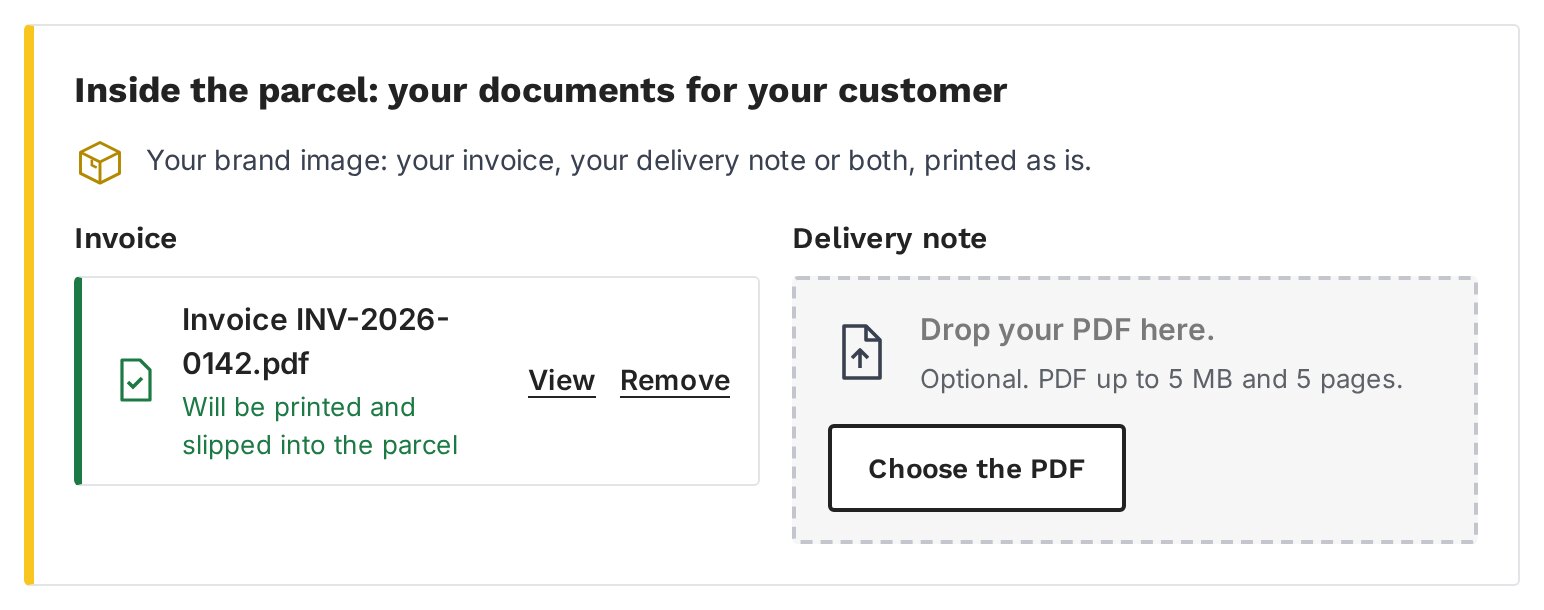
The carrier makes no difference: Colissimo, Chronopost, DHL or DPD, your documents are in the parcel. Shipping from your pallet? The “Inside the parcel” step is waiting for you on the shipping page too.
Invoice, delivery note or both?
It depends on your relationship with the customer.
A private buyer expects the invoice in the parcel. Attach it: it is the simplest way to look professional.
A garage receiving the part on behalf of an end customer does not need to see your prices. The delivery note is enough, and the invoice goes by email.
A business customer who checks incoming goods will appreciate both: the delivery note to check the parcel, the invoice for their accounts.
Documents that print clearly
Your documents are printed as they are, in black and white. Export them as PDF from your invoicing software without retouching them. A clean layout and a high-contrast logo stay sharp when printed. Each document can be up to 5 pages long.
Your documents stay confidential
Your invoice contains your prices and your customer's details. It is used only to be slipped into the parcel. We do not pass it on to anyone else, we do not reuse it, and it is deleted within a month of shipping.
Customer outside the European Union?
For Switzerland, the United Kingdom or the French overseas departments, the parcel also travels with a customs pouch. Here too, everything is in your name: the CN23 and the commercial invoice carry your company name, your logo and your selling prices. Find out more in our article CN23 for dropshipping.
Frequently asked questions
Can I put my own invoice in a dropshipped parcel?
Yes. Upload it as a PDF when you order, at the carrier step. We print it and slip it into your customer's parcel.
Will my customer see JDM Distribution's prices?
No. No JDM invoice goes into the parcel. Your customer only sees the documents you uploaded.
Can I change the document after confirming the order?
Until you confirm, you can remove or replace it freely. After that, contact us as soon as possible, before the parcel is prepared.
Which files are accepted?
A PDF of up to 5 MB and 5 pages for each document. Uploading is optional.
You sell, we ship
The service is included in every trade account at no extra cost. Not a customer yet? Registration is free and reserved for automotive and e-commerce professionals.
Share this content